
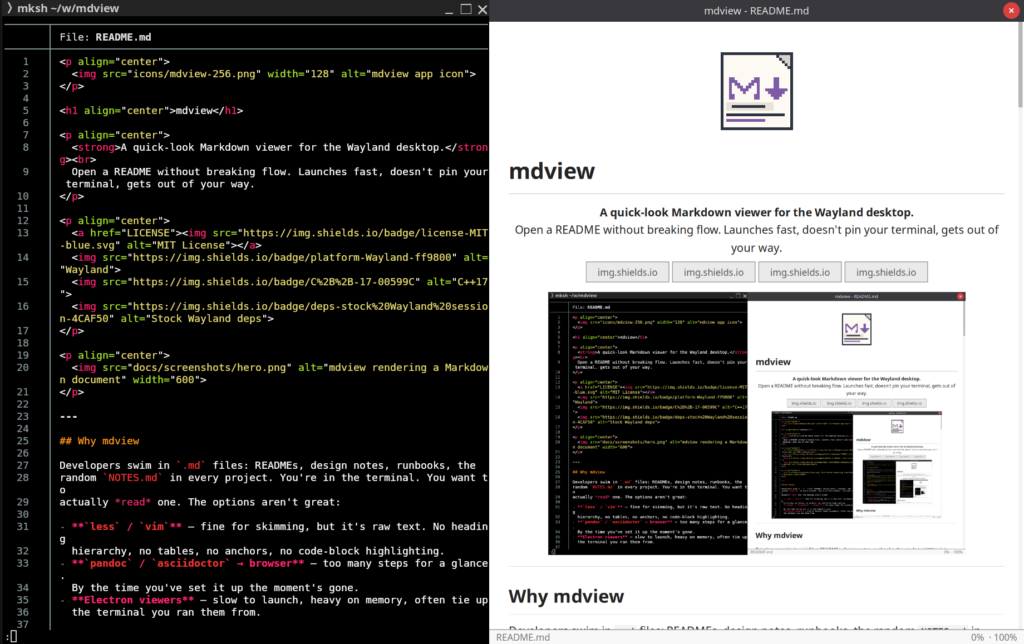
I wrote mdview because I wanted a fast Markdown viewer for the Wayland desktop, a way to glance at a README or a design note without breaking my flow.
Developers spend a lot of time around Markdown files: READMEs, runbooks, changelogs, design notes, random NOTES.md files in project directories. Most of the time I’m already in a terminal when I want to read one.
The usual options all work, but none of them feel quite right.
less and vim are fast, but they show raw text. That works, but I usually need longer to understand what I’m looking at. Markdown is often written to be read as structured text. Headings, tables, links, anchors, images, and highlighted code blocks make it easier to work with.
Converting through pandoc or opening a browser works, but it’s too much ceremony for a glance.
Electron-based viewers are comfortable, but they’re too heavy for taking a quick look, especially when you don’t have one open already. I don’t want to launch a whole application stack just to read a README next to my terminal.
So mdview tries to sit in the missing middle: fast enough to feel like a small tool, but capable enough to actually read Markdown.
The project is available on CodeFloe: codefloe.com/beleon/mdview.
Why I tried native Wayland
For this project, I wanted to see how far I could get without a general GUI toolkit or browser engine.
GTK would have been a perfectly reasonable choice. A toolkit would have solved many details I had to handle myself: input, clipboard, window decorations, scaling, cursors, gestures, and a lot of small desktop integration work.
I avoided GTK (not because I think it’s bad) because this project was small enough that the direct approach still felt manageable. A larger application should probably make different choices, but a small viewer with a narrow scope can afford to be more direct.
mdview talks to Wayland directly. It uses xdg-shell, shared-memory buffers, input handling, clipboard support, cursor shape, pointer gestures, window decorations, and toplevel icons.
mdview also doesn’t include an XWayland fallback. It targets the environment I use it in directly, and adding another compatibility path would have made the project larger than I wanted it to be.
So the trade-off is more code in some places and fewer moving parts overall, which felt right for this scope.
The rendering pipeline
The architecture is simple enough to explain in one diagram:
.md file
   ↓
md4c
Markdown → HTML
   ↓
litehtml
HTML/CSS → layout
   ↓
Cairo + Pango
drawing + text shaping
   ↓
wl_shm buffer
   ↓
Wayland window
md4c handles the Markdown parsing, litehtml the HTML/CSS layout. A browser engine, JavaScript, a DOM and a network stack are all more than I need to render Markdown as structured text.
Cairo and Pango handle drawing and text. The final result is drawn into a shared-memory buffer and presented through Wayland.
I used C++17 mostly because it fit this stack. md4c is C, litehtml is C++, and Cairo, Pango, and the Wayland protocol bindings are C. Rust would have been nicer for ownership and lifetime management, but for this set of libraries C++ was the path of least resistance.
The architecture isn’t especially flexible, but I can still read all of it, and for this project that mattered more.
What the measurements showed
I wanted mdview to feel like something you can use while working in the terminal.
That doesn’t mean it has to be tiny in the cat or less sense. It’s doing real Markdown rendering, layout, text shaping, image loading, syntax highlighting, text selection, and UI interaction. But it should still feel like a quick viewer, not like launching a whole application.
The stripped binary is 2.6 MB. That doesn’t make the whole runtime tiny (the rendering stack and desktop libraries still count), but it says something about the scope of the tool.
These are just the measurements that helped me understand where mdview spends its time and memory on my machine, not a benchmark.
test.md (792 B, 125 spans)              267 ms      RSS 34 MB
Nextcloud README (6.1 KB, 697 spans)    344 ms      RSS 47 MB
mdview README (8.7 KB, 1420 spans)      426 ms      RSS 67 MB
For reference, Typora (from the .deb package) takes about 2.5 seconds to open on the same machine. Typora is a full Markdown editor rather than a quick-look viewer, so this isn’t a fair comparison, but it’s the kind of startup delay I wanted to avoid when I just want to read a file.
The times break down like this:
file read           :   <2 ms
state + config load :   <2 ms
md4c + heading IDs  :   <3 ms
litehtml doc build  :  120–300 ms
window create       :   17–30 ms
wait for first paint:  120–170 ms
File I/O and Markdown parsing are basically below the noise floor here.
The two real costs are layout and first paint. litehtml document construction and layout dominate the part that scales with the document. The compositor first-paint wait is a mostly fixed cost on my setup.
Wayland surface creation is only 17–30 ms in these measurements, so it’s not where the time goes. The no-toolkit decision probably saves some startup time, but I wouldn’t overstate that. Creating one window isn’t what makes a toolkit slow.
The bigger trade-off is the full dependency surface, memory footprint, initialization path, and how much application machinery I want to bring into a small viewer. That part matters more to me than the window creation.
I also looked at memory use, but the conclusion was simpler. Most of it comes from the rendering stack and desktop text/image infrastructure around it: fontconfig, Pango, Cairo, image loading, litehtml, and allocator overhead. There are still places to optimize, but going much lower would probably mean replacing larger parts of the rendering stack. For now, that doesn’t feel worth it.
What stayed outside the scope
There are many things mdview doesn’t try to do.
It’s read-only on purpose. Editing, plugin systems, knowledge-base features, and browser-like behavior would all make it a different kind of application.
The goal is good everyday Markdown reading rather than browser-level compatibility with every corner case.
The same applies to installation and runtime assets. The binary has the icons baked in. Installation can still write icons and a .desktop entry under ~/.local/, but running the program doesn’t depend on finding runtime files in the right place.
None of this is universally correct, these are just the choices that made sense (to me) for this project.
Small software can still be awkward, limited, or hostile to users. Removing things for the sake of it doesn’t help anyone. The idea is to avoid bringing along parts that don’t earn their place.
Where mdview fits
The best way to describe mdview is still: somewhere between less and Electron.
less is fast and always there, but it doesn’t give you a rendered document.
Electron can give you a rich interface, but it’s often more application than I want for this job.
mdview sits somewhere in between. It renders Markdown properly, opens quickly, detaches from the shell, supports find, live reload, dark mode, zoom, text selection, links, images, highlighted code, and an outline sidebar, but it stays narrow.
That’s what I was aiming for here: small enough to understand, capable enough to be useful.
mdview isn’t meant to be the Markdown application for everyone. It’s just a tool for a particular moment:
I’m working in a terminal.
There is a Markdown file.
I want to read it without changing context too much.